🚀 Welcome to MDriven Learn –  MDriven is now on Discord!  Don’t miss the latest Release Notes.
Resolve 'Not able to start' Error
This page was created by Wikiadmin on 2026-07-29. Last edited by Wikiadmin on 2026-07-29.

You can restore a Turnkey application that shows Not able to start by uploading a model, selecting a usable CurrentVersion, and ensuring that the application is started.

When Turnkey displays this message:

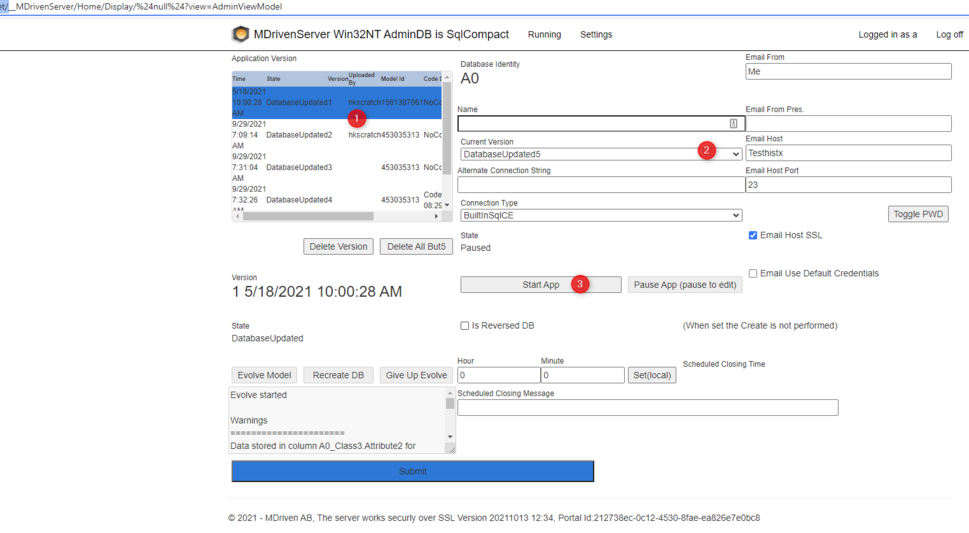
Not able to start, check the CurrentVersion - is it set? Check that the app is Started and not Paused. Check that the Version is in DatabaseUpdated state

MDrivenServer cannot select a model version that it can run. Check the application and its uploaded model versions in MDrivenServer before investigating IIS or Turnkey deployment.

What the message means

CurrentVersion is the model version that MDrivenServer should use for the application. The selected version must be available and have the state DatabaseUpdated.

The application must also be Started. A Paused application does not allow normal work, even when it has a valid CurrentVersion.

For example, an application with three uploaded versions cannot start if no version is selected as CurrentVersion. It also cannot start if its selected version has not reached the DatabaseUpdated state, or if the application has been paused.

Resolve the error

Follow these checks in order. Recheck the Turnkey application after each correction.

  1. Open the MDrivenServer administration area for the MDrivenServer used by the Turnkey application.
  2. Locate the application that Turnkey is trying to start.
  3. Check whether the application has any uploaded model versions.
    • If the version list is empty, upload a model from MDriven Designer. MDrivenServer has no model to run until a model has been uploaded.
  4. Check the application's CurrentVersion.
    • If CurrentVersion is not set, select an uploaded version as the CurrentVersion.
  5. Check the state of the selected version.
    • The version must be in the DatabaseUpdated state. Do not use a version in another state as the CurrentVersion for normal application use.
  6. Check the application state.
    • If the application is Paused, start it. The application must be Started, not Paused.
  7. Return to Turnkey and try to start or use the application again.

Diagnostic checklist

Check Expected result If the check fails
Uploaded model versions At least one model version is listed for the application. Upload a model from MDriven Designer.
CurrentVersion CurrentVersion identifies one of the uploaded versions. Set CurrentVersion to an uploaded version.
Selected version state The CurrentVersion is in DatabaseUpdated state. Complete the work required for that version to reach DatabaseUpdated, then use that version.
Application state The application is Started. Start the application; do not leave it Paused.

Common situations

A newly installed application

A new MDrivenServer installation can be reachable while the application still has no uploaded model. In this case, the version list is empty and there is no valid CurrentVersion to select. Upload the model from MDriven Designer, confirm that the version reaches DatabaseUpdated, set it as CurrentVersion, and start the application.

For Windows installation and initial MDrivenServer setup, see HowTos:Installing MDriven Server on Windows.

A model was uploaded but the application still will not start

Do not assume that uploading a model changes the application's active version. Verify both that CurrentVersion is set and that it refers to the version in DatabaseUpdated state. Then verify that the application has not been paused.

The problem occurs after deployment

This message is specifically about the application model and state in MDrivenServer. If the model/version checks pass but deployment has failed or the deployed components are not the expected ones, continue with HowTos:Troubleshoot Turnkey Deployment.

Turnkey does not start in IIS

If IIS cannot start the Turnkey application, or if you need IIS error details, use HowTos:Troubleshooting IIS application startup issues. That is a separate problem from a missing CurrentVersion or a paused application.

Do not confuse this with other errors

See also