
Intro and Explanations[edit source]
In order to connect SPA's built with pure-javascript or React or Angular or Vue or anything else, we must address these needs:
- Cors - allows foreign apps to query our Turnkey server. Read the specifics here.
- Authentication - allows foreign apps to acquire a jwt from somewhere (Oauth host). We want to check it and possibly accept it.
- Stay logged in - with a cookie after initial authentication.
To show this, we can use the Microsoft SPA example from here: https://docs.microsoft.com/en-us/azure/active-directory/develop/tutorial-v2-javascript-auth-code
If you follow all the instructions there, you will soon have an SPA application that logs in with Azure AD - and gives you an idToken that is in jwt format (really jws as they are signed).
Once you have this example, follow the lead and add another button, just like the readMail and seeProfile buttons from the sample:
function readTurnkey() {
    getTokenPopup(loginRequest)
        .then(response => {

            const headers = new Headers();
            const bearer = `Bearer ${response.idToken}`;
            const endpoint ='http://localhost:5052/TurnkeyRest/Get?command=RestExample'
            headers.append("Authorization", bearer);

            const options = {
                method: "GET",
                headers: headers
            };

            console.log('request made to Turnkey API at: ' + new Date().toString());

            fetch(endpoint, options)
                .then(response => response.json())
                .then(response => updateUI(response, endpoint))
                .catch(error => { console.log(error); });


        }).catch(error => {
            console.error(error);
        });
}
What we do here is acquire a new idToken and send it to a Turnkey Rest API that, in this case, is at http://localhost:5052/TurnkeyRest/Get?command=RestExample
The json we get from this call is sent to updateUI where we do this:
   else {
        // turnkey data:
        try {
            profileDiv.innerHTML = JSON.stringify(data);
        }
        catch (err) {
            profileDiv.innerHTML = data.toString();
        }

    }
To handle Cors and Authentication in the model, I follow the stipulated pattern and add this:

The methods are implemented like this:
GetAllowOriging:

if KnownExternalApp.allinstances->exists(x|(x.Origin=org) and (x.IsOk)) then
  true -- we want to allow this app to call us
else
  false
endif

AcceptAndTransformUserName:
if KnownExternalApp.allinstances->exists(x|(x.Audience=audience) and (x.IsOk)) then
  user -- we want to allow all users from this domain if they exists in our domain
else
  ''
endif
Checklist[edit source]
- Make sure your Azure app registration says SPA and not only Web.
- Make sure your Modulus attribute is made longer than 255 chars -> say 500 chars to be sure.
- The Audience property is equal to your Application identity; a Guid you get from Azure (or Google or your Auth provider)
- Find the ouath provider keys from the oauth-server. You can find Azure here: https://login.microsoftonline.com/common/discovery/v2.0/keys (there will be multiple - 5ish)
- Create a SysExternalJWTDefinition for each unique "kid"== key-identifier, and copy the "n" value to Modulus attribute(Make it 500 chars long so all of it fits!), copy the "e" to the exponent attribute.
- Create a KnownExternalApp and set its origin to the URL its hosted on (add many objects if it is hosted on many servers); in my example: for http://localhost:62031 paste in the Application identity from your oauth provider in the Audience attribute, set IsOk to true.
Code Example[edit source]
The demo SPA app is taken from: https://docs.microsoft.com/en-us/azure/active-directory/develop/tutorial-v2-javascript-auth-code with a few small additions and config-changes. You can download these changes from here instead: SPA website example.
The Turnkey system that the demo SPA app gets data from can be downloaded here: Turnkey model that servers the SPA
- Start Visual Studio and open the SPA website as "website". Run it - navigate to yourlocaladress/app3 to see the UI
- In order to login, create an App registration on any Azure account and make a note of particulars and update the website code so it matches what you got:
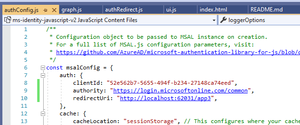

Now your SPA app should be able to 1) start and 2) Login with an account in your azureAD or any azureAD depending on your settings in the app registration:

This is how it should look once logged in:

Read Turnkey button must have a functioning Turnkey server in order to work. Start MDrivenDesigner and open the downloaded Modlr file.

If your server has another address than localhost:5052 - change the SPA app accordingly:

The Modlr file also had data in the xml persistence that defines keys and KnownApp-objects. If your URLs are different, you may need to update in the knownApp object:


Register an account on the Turnkey-app with the same email address as the account you use in your SPA app and log in. You can now see the RestApi result here: http://localhost:5052/Turnkey/AngularApp#/RestExample/$null$
We can now test that we get the same result when running the SPA app rest call:

You can also verify that you do not get any data if the account email does not match or if you are not logged in.