🚀 Welcome to MDriven Learn –  MDriven is now on Discord!  Don’t miss the latest Release Notes.
SysMDrivenMiscSettingsSingleton
This page was created by Hans.karlsen on 2024-02-09. Last edited by Wikiadmin on 2026-07-29.

You can configure selected MDriven Turnkey and MDrivenServer UI behaviors by adding the singleton settings class described on this page to your model.

Purpose and scope

SysMDrivenMiscSettingsSingleton is a model singleton that MDriven recognizes by name. Add attributes with the exact names and types below to enable the corresponding global behavior.

These settings apply globally. For example, setting GlobalReadOnlyMode changes the editing behavior throughout the application; it is not a per-ViewModel setting. Test every affected ViewModel after changing a setting.

Add the settings singleton

  1. In your MDriven model, create a singleton class named SysMDrivenMiscSettingsSingleton.
  2. Add only the attributes you need, using the exact attribute name and type shown below.
  3. Set the attribute value on the singleton instance.
  4. Deploy the updated model and verify the behavior in the Turnkey UI.

The class name and attribute names are recognition points. For example, an attribute named GlobalToolbar does not configure GlobalToolbarMode.

Recognized attributes

Attribute Type Effect Example use
GlobalReadOnlyMode Boolean Enables global read-only mode. Set it when users must review data without making changes.
GlobalToolbarMode Boolean Enables global toolbar mode. Use it when the application should use the toolbar-oriented interaction mode.
GlobalHideActionOnDisable Boolean Hides actions when they are disabled. Set it to avoid showing commands that the current user cannot use.
LibreOfficeInstallPathAndExe String? Specifies the LibreOffice executable path. C:\Program Files\LibreOffice\program\soffice.exe
GlobalCenteredPopUp Boolean Centers pop-up windows. Set it when pop-up placement should be centered consistently.
GlobalBlazorClient Boolean Selects the Blazor client rather than the AngularJS client by default. Do not use for new configuration; use GlobalMainUIEngine instead.
GlobalBlazorClientComponentOverride String Loads an implementation of IComponentTypeSwitchBroker that can replace Blazor components based on your switch logic. Use a component broker to replace a component type for selected component holders. See Documentation:Blazor IComponentTypeSwitchBroker.
GlobalNavigateOnDoubleClickWithoutMenu Boolean Makes a double-click take the first action when that action is a navigation action. Normally this occurs only when exactly one action is enabled. Set it when users should open a navigable item directly from a grid.
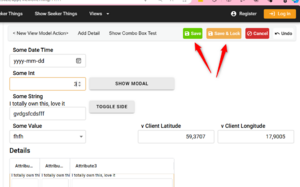
GlobalReadOnlyModeUseSaveAndLock Boolean Adds Save and Save&Lock buttons to the toolbar in read-only mode. Set it when users frequently need to unlock, edit, save, and return to a locked state.
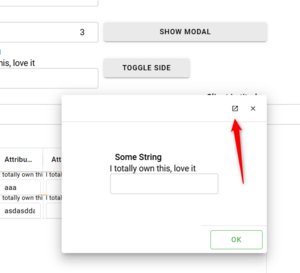
GlobalModalOfferOpenStandalone Boolean Offers an additional button in a modal dialog that opens that view as a standalone view in a separate tab. Set it when users need to continue work that cannot fit within a modal dialog.
GlobalUnRootedAlwaysNew (GlobalSeekersAlwaysNew) Boolean Creates a new instance when opening an unrooted form or seeker form, rather than reusing an existing instance. Set it when users must keep two independent searches open; changing the search in one view will then not be reflected in the other view.
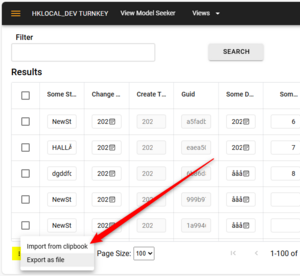
GlobalSeekerGridExportFileMaxRows Integer? Limits the number of rows exported when the user chooses Export as file from a Seeker's More menu. Set 10000 to limit an export file to 10,000 search-result rows.
GlobalSeekerGridShowImportOnlyONTV Boolean Controls when Import from clipboard appears in a Seeker's More menu. When false (the default), the command is shown. When true, it is shown only when the ViewModel has TV GlobalSeekerGridShowImport=true.
GlobalMainUIEngine String Selects the default main UI engine. Set one of the recognized values: App# for AngularJS, appl for Blazor WebAssembly, or appli for Blazor ServerSide.

Configure the main UI engine

Use GlobalMainUIEngine to choose the default client UI engine. GlobalBlazorClient is deprecated.

For example, to make Blazor WebAssembly the default UI, add GlobalMainUIEngine as a String attribute and set its value to appl. Do not also depend on GlobalBlazorClient for the same choice.

Replace Blazor components by switch logic

Use GlobalBlazorClientComponentOverride only when you have implemented IComponentTypeSwitchBroker. The broker receives an IMDCompHolder and the requested component Type, and returns the component type to use.

Provide the setting as semicolon-separated assembly names followed by the type that implements IComponentTypeSwitchBroker:

AssemblyNameWithoutExtension;AdditionalAssemblyIfNeededWithoutExtension;TheTypeImplementing_IComponentTypeSwitchBroker

You can include additional assembly names before the implementing type. See Documentation:Blazor IComponentTypeSwitchBroker for the interface and component-replacement details.

Modal-dialog limitation

A modal window does not show left-side actions. Nested modal dialogs are not supported. If a user needs to open a related view while working in a modal, set GlobalModalOfferOpenStandalone to offer the standalone-tab alternative.

Seeker behavior examples

A Seeker is a search-oriented form. The following settings affect common Seeker workflows:

  • To let a user compare two independent searches, enable GlobalUnRootedAlwaysNew (or the recognized seeker setting name for your MDriven version). Each open creates a separate form instance.
  • To cap download size, set GlobalSeekerGridExportFileMaxRows. A user selecting More and then Export as file receives no more than that number of rows.
  • To expose clipboard import only in explicitly prepared ViewModels, set GlobalSeekerGridShowImportOnlyONTV=true and add TV GlobalSeekerGridShowImport=true to each ViewModel that should show the command.

Related system configuration

SysMDrivenMiscSettingsSingleton configures recognized global UI and server behaviors. It does not replace Documentation:SysSingleton, which is the application's primary root object for login information. For optional per-session values such as client IP, system type, and user agent, see Documentation:SysSingleton optional properties.

See also